

MiniMax omni-modal video model

Official model guide and online generator

MiniMax H3 AI Video Generator

Generate 2K video with native stereo sound from text, frames, and up to fifteen reference images, clips, and audio tracks at once. Use the MiniMax H3 AI video generator directly below to create from a prompt, image, frame pair, or supported references.

MiniMax H3 AI video generator showcase
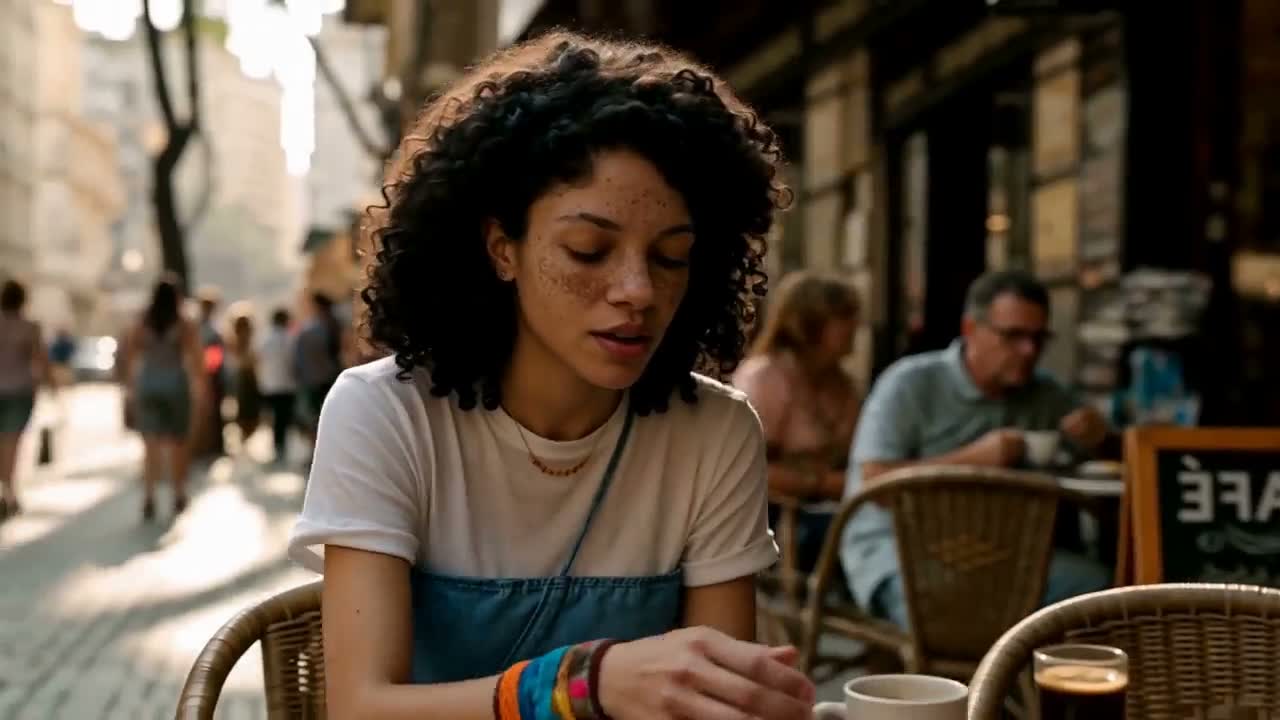
MiniMax's own launch footage, re-encoded for the web. The shot was generated from a reference video, a reference image, and a reference audio clip.

Generate with MiniMax H3 online

The complete Musci3 video workspace is embedded here and starts with MiniMax H3 selected. You can still compare variants or switch models without losing the rest of the workflow.

Loading the MiniMax H3 AI video generator…

Generation requires an account and uses credits based on the selected model, variant, duration, resolution, and other settings. Failed tasks are refunded automatically.

What is MiniMax H3 and when should you use it?

MiniMax H3, released as Hailuo 3.0 in the Hailuo app, is a general-purpose omni-modal generation model rather than a text-to-video model with reference features bolted on. Text, images, video, and audio enter as one context, and the model returns picture and 32 kHz stereo sound generated together. Earlier video stacks split this work across separate expert models for text-to-video, image-to-video, first-and-last-frame, subject reference, motion reference, and editing; H3 folds them into a single model that takes the relationship between your references and your shot as plain language.

Native output at 24 fps
2K

Native output at 24 fps

Clip length, in whole seconds
4–15s

Clip length, in whole seconds

Reference images, clips, and audio per generation
9+3+3

Reference images, clips, and audio per generation

Native stereo sound on every take
32 kHz

Native stereo sound on every take

Omni-reference

One context. Text, image, video, and audio.

This is MiniMax's own demonstration, and it is the clearest statement of what separates H3 from a text-to-video model with a reference slot. Three files of three different kinds went in, along with one sentence describing how they relate to each other. No mode switch, no separate motion-transfer model, no post-production pass to add the voice.

The references

Video 1
Image 2
Image 2
Audio 3

Reference the Hitchcock camera movement from Video 1, have the character in Image 2 sing, with the vocals matching Audio 3.

Capabilities

What the extra resolution and the extra track actually buy you

2K that holds up at full screen

H3 generates at 2K rather than enlarging a smaller result, so skin texture, fabric weave, reflections, and small on-screen type stay readable when the clip fills a display instead of a feed thumbnail. That matters most on the shots you were previously forced to reshoot or retouch: close-ups, product surfaces, and anything with legible detail near the edge of frame.
Voice, effects, and music from the same model

Sound is not a second job here. H3 predicts audio and video latents together and returns 32 kHz stereo, with stable dialogue across eleven languages, so lip movement and vocals are generated against each other rather than aligned afterwards. Every generation on this page comes back with its track already attached — there is no audio toggle to forget.

How H3 gets to 2K

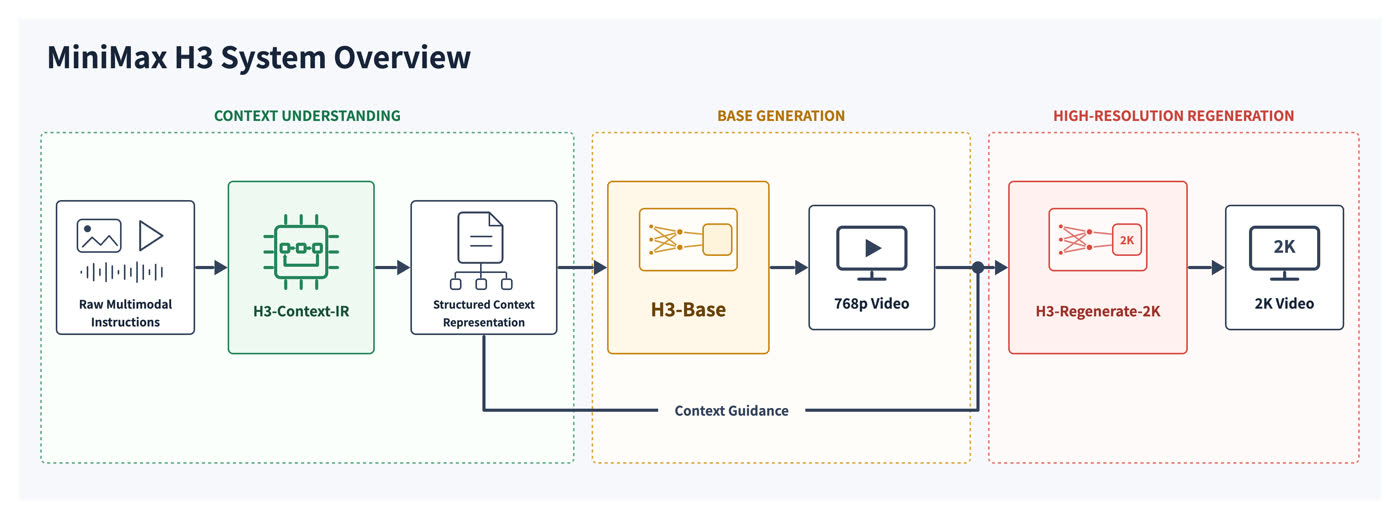
The system runs in three stages. H3-Context-IR reads your free-form multimodal input and rewrites it as a structured context. H3-Base generates picture and sound together at 768p. H3-Regenerate-2K then feeds that result back through the model along with the original context, so the higher resolution is generated from the scene's own information instead of interpolated on top of it.

MiniMax H3 system overview: context understanding, base generation at 768p, and 2K regeneration

MiniMax H3 compared with Hailuo 2.3

Both models are on Musci3. Hailuo 2.3 remains the cheaper choice for expressive single-shot motion; H3 is the one to reach for when a shot needs sound, references, or delivery resolution.

CapabilityHailuo 2.3MiniMax H3
Generation modesText and image to videoText, image, first-and-last-frame, and omni-reference
Resolution768p and 1080p768p and native 2K
Duration6 or 10 secondsAny whole number from 4 to 15 seconds
AudioSilent; sound designed in postNative 32 kHz stereo, generated with the picture
Reference inputsOne starting imageUp to 9 images, 3 video clips, and 3 audio clips
Aspect ratios16:9 landscape21:9 through 9:16

The four jobs MiniMax built it for

Each clip below is MiniMax's own example for that category, generated with H3 and re-encoded here. Open the generator above to work in the same modes.

Film opening titles

Build title sequences that cut between shots and carry their own score and sound design, at delivery resolution.

Product websites

Produce hero loops and scroll sections for a launch page, with the product held steady by reference images.

Animated posters

Turn a key visual into a vertical motion piece for app stores, out-of-home screens, and social placements.

Advertising and ecommerce

Direct short vertical spots with voiceover, effects, and music generated alongside the picture in one pass.

Start generating

How to create video with MiniMax H3

Move from a creative idea to a configured MiniMax H3 generation without leaving this model page.

1

Describe the shot

Write the subject, action, environment, camera, style, timing, and sound. If you have reference media, upload it and explain the role of each asset.

2

Configure MiniMax H3

Keep MiniMax H3 selected, choose the appropriate variant, mode, duration, aspect ratio, resolution, and audio settings, then check the displayed credit cost.

3

Generate, review, and reuse

Start the task, follow progress in the result panel, review the completed video, reuse its settings for another take, or download the finished file.

MiniMax H3 AI video generator FAQ

What is MiniMax H3?

MiniMax H3 is MiniMax's general-purpose omni-modal video model, released on 31 July 2026 and shipped in the Hailuo app as Hailuo 3.0. It understands text, images, video, and audio as one context and generates video with native stereo sound at up to 2K and up to fifteen seconds. It is the successor to Hailuo 2.3.

How is H3 different from a normal text-to-video model?

Most video stacks split the work across separate expert models: one for text-to-video, one for image-to-video, one for first-and-last-frame, others for subject reference, motion reference, and editing. H3 was pre-trained as a single model that takes the relationship between your references and your target shot as plain language, which is why one prompt can pull camera movement from a video, a character from an image, and a vocal from an audio clip.

What resolution and length can MiniMax H3 generate?

Any whole number of seconds from 4 to 15, at 24 fps, in either native 2K or 768p. Supported aspect ratios run from 21:9 to 9:16, including 16:9, 4:3, 1:1, and 3:4. When you generate from a prompt alone you need to pick an aspect ratio explicitly; when you supply frames or references, the input decides the output shape.

Does MiniMax H3 generate audio?

Always. H3 returns 32 kHz stereo on every generation and there is no audio toggle to switch off, because picture and sound are predicted together rather than in two passes. Dialogue is stably supported in eleven languages: Arabic, Chinese, English, French, German, Italian, Japanese, Korean, Portuguese, Russian, and Spanish.

How many references can I upload?

Up to 9 images, 3 video clips, and 3 audio clips, with a ceiling of 12 files in total. Each video and audio clip must run between 2 and 15 seconds. Audio cannot be the only reference — it has to arrive with an image or a video so the model knows what the sound belongs to.

Can I combine first-and-last frames with reference files?

No, and the generator will tell you so before it spends credits. H3 exposes two input modes: a frame mode that takes zero, one, or two images as the opening and closing frames, and an omni-reference mode that takes the mixed image, video, and audio references. Frames and references belong to different modes, so pick the one that matches the control you need.

How much does MiniMax H3 cost on Musci3?

Credits are charged per second of output and depend on the resolution you pick, with 768p costing meaningfully less than 2K. The first five reference images are included; further images add a small per-image amount. The exact credit cost for your settings is shown in the generator before you start, and failed tasks are refunded automatically.

Are the MiniMax H3 weights open?

Yes. MiniMax published the complete weights on Hugging Face on 3 August 2026 under the MiniMax H3 Community License, including support for fine-tuning; the initial release ships full-attention inference, with the sparse-attention implementation to follow. Running them yourself takes serious hardware, so the generator on this page calls the hosted model instead.

Official MiniMax H3 sources

Model capabilities and media on this page were researched from the developer's official product pages, announcements, and documentation.

Create your next video with MiniMax H3

Open the complete MiniMax H3 AI video generator above, add your prompt or references, and turn the next shot on your list into a finished video.

Start generatingBrowse all models